This is a version of Fake Software Download Site Scam.
Fake SpiderFoot Download Site (spiderfoot.org) Confuses Google Results
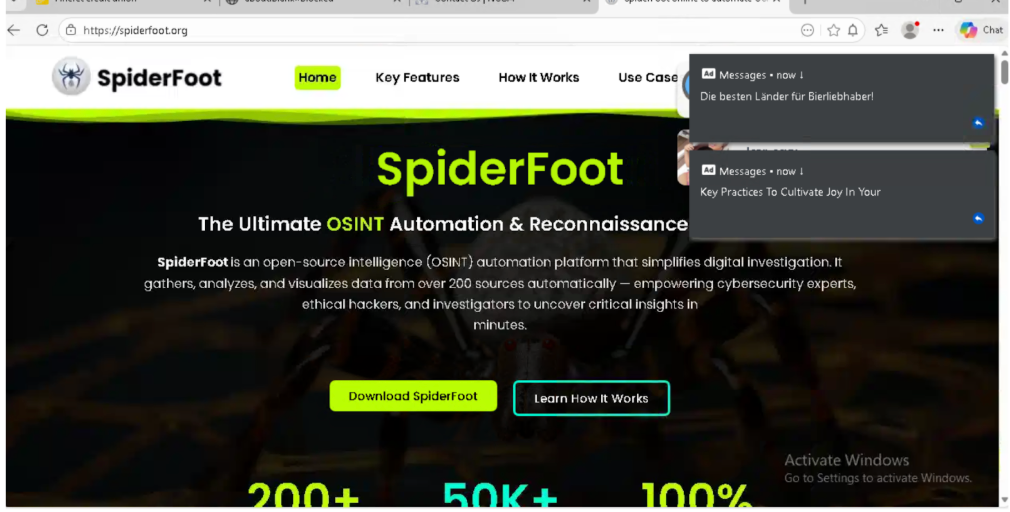
People searching Google for the “SpiderFoot” security tool may find “spiderfoot.org” listed high in the results, sometimes even called the official site by Google’s AI summaries. While the website contains real information and technical details about SpiderFoot, it is not the real official project page—hidden in small print, the site says it has “no official affiliation.” Trying to download the tool, users are sent to sites like YouTube or 4sync and asked to log in with Facebook or Google, instead of being directed to the real project page on GitHub. The site contains advertising banners, popups, and unrelated redirects that are red flags for a scam, putting users’ computers and personal accounts at risk.
What’s different in this version
These traits set this message apart from the usual pattern.
-
Search engines and AI summaries sometimes mistakenly identify this site as official.
-
The footer contains a disclaimer, but the rest of the site mimics the real project.
-
Download links redirect to unrelated sites needing personal logins.
-
Extra popups and ad banners, which are never seen on the real software site.
How this scam works
- 1
Step 1: A user searches online for popular software (for example, a free tool or open-source program).
- 2
Step 2: In the search results, a website appears that looks official, often using the actual software name, logo, and technical details.
- 3
Step 3: The download links on this fake site lead to third-party hosting services, video sites requiring login, or large pop-up ads.
- 4
Step 4: The site may even feature footnotes or disclaimers admitting it's not official, but these are easy to miss.
- 5
Step 5: Unknowingly, the user downloads possibly unsafe files or hands over account details to unrelated websites.
✓ Do this
- Check that you are on the official software website before downloading anything. Look for addresses ending in github.com or those linked on the developer’s verified pages.
- Avoid sites full of ads, popups, or messages saying your browser is out of date.
- Ask for help or check trusted sources if you’re unsure where to download something.
- Read the fine print and footers—real software rarely needs big disclaimers about being unofficial.
✗ Avoid this
- Don’t download programs from random sites, even if they show up first in search results.
- Never enter your Google, Facebook, or email login just to get a simple download.
- Don’t ignore messages or disclaimers that say a website is not affiliated with the real project.
- Don’t trust software download sites full of unrelated ads or that always redirect you elsewhere.