This is a version of Fake Software Download Site Scam.
Fake GitHub Setup Download Page (gitappsdown.pro) Delivers Password-Protected RAR
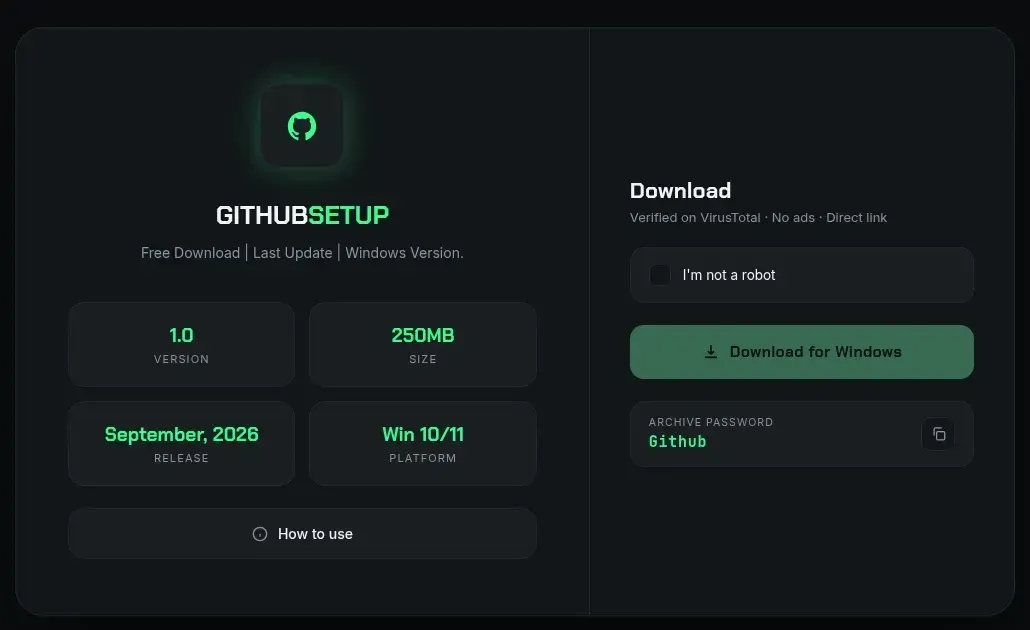
The site gitappsdown[.]pro shows a dark, professional-looking page titled "GITHUBSETUP" that uses GitHub's logo and offers a free "Download for Windows". It claims to be version 1.0, about 250MB, released September 2026, for Windows 10 and 11, and it reassures visitors with a fake "I'm not a robot" box and the line "Verified on VirusTotal". The download button leads to a file on Google Drive: a roughly 300MB password-protected .rar, with the password ("Github") shown on the page itself. GitHub does not hand out a "GitHub Setup" installer this way. The displayed password and the large file size are used to stop antivirus tools and scanners from checking the file. The page was captured on an investigation machine; the archive was preserved but not opened or run, so what it installs is not established.
What’s different in this version
These traits set this message apart from the usual pattern.
-
Impersonates GitHub itself with a "GITHUBSETUP" Windows installer page, rather than posing as a third-party download for someone else's software as in the other instances in this family.
-
The domain name "gitappsdown" (git apps down) appears aimed at people searching during a GitHub outage.
-
The download is a direct Google Drive link to a roughly 300MB password-protected .rar, with the archive password ("Github") displayed on the page, instead of a redirect chain to file-hosting or login-walled sites.
-
The page adds fake trust signals: an "I'm not a robot" checkbox and the line "Verified on VirusTotal · No ads · Direct link".
-
The oversized, password-protected archive is a technique to evade automated antivirus and sandbox scanning; the exact payload was not opened or run.
How this scam works
- 1
Step 1: A user searches online for popular software (for example, a free tool or open-source program).
- 2
Step 2: In the search results, a website appears that looks official, often using the actual software name, logo, and technical details.
- 3
Step 3: The download links on this fake site lead to third-party hosting services, video sites requiring login, or large pop-up ads.
- 4
Step 4: The site may even feature footnotes or disclaimers admitting it's not official, but these are easy to miss.
- 5
Step 5: Unknowingly, the user downloads possibly unsafe files or hands over account details to unrelated websites.
✓ Do this
- Check that you are on the official software website before downloading anything. Look for addresses ending in github.com or those linked on the developer’s verified pages.
- Avoid sites full of ads, popups, or messages saying your browser is out of date.
- Ask for help or check trusted sources if you’re unsure where to download something.
- Read the fine print and footers—real software rarely needs big disclaimers about being unofficial.
✗ Avoid this
- Don’t download programs from random sites, even if they show up first in search results.
- Never enter your Google, Facebook, or email login just to get a simple download.
- Don’t ignore messages or disclaimers that say a website is not affiliated with the real project.
- Don’t trust software download sites full of unrelated ads or that always redirect you elsewhere.