This is a version of Booking.com Host Reservation Change Scam.
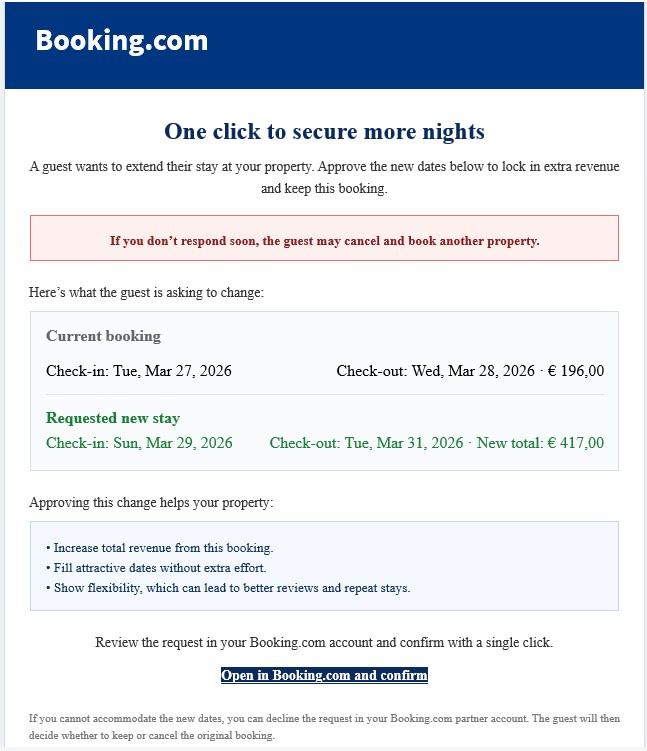
Booking.com guest wants to extend their stay email
This example is aimed at Booking.com property owners or managers. It says a guest wants to extend a stay and frames approval as a simple way to secure more nights and more revenue. The message pressures the host to act quickly by warning that the guest may cancel and book another property if there is no response soon.
What’s different in this version
These traits set this message apart from the usual pattern.
-
Targets Booking.com hosts rather than travelers.
-
Uses a guest stay extension request as the reason to click.
-
Promises extra revenue to lower suspicion and encourage quick action.
-
Shows side-by-side booking dates and totals to look like a real partner notification.
How this scam works
- 1
Step 1: A host receives an email or message that looks like it came from Booking.com about a guest reservation.
- 2
Step 2: The message says the guest wants to change dates, extend the stay, or make another booking-related update.
- 3
Step 3: It creates urgency by warning that the guest may cancel unless the host responds right away.
- 4
Step 4: The host is pushed to click a button that appears to open Booking.com and confirm the request.
- 5
Step 5: The link can lead to a fake Booking.com page that steals login details or access to the host account.
✓ Do this
- Log in to Booking.com directly from your normal browser bookmark or app to check whether the request is real.
- Turn on strong two-factor authentication and review your account for unfamiliar logins or changes.
- Contact Booking.com support through the official partner dashboard if you are unsure whether a reservation request is genuine.
✗ Avoid this
- Do not click links in unexpected reservation-change emails, even if the branding looks real.
- Do not enter your Booking.com login details on pages you reached from email buttons.
- Do not rush because of warnings that a guest will cancel unless you act immediately.
Verbatim excerpts from the scam
Exact lines from emails or messages—searchable text so you can compare wording.
- 1 Excerpt 1One click to secure more nights
- 2 Excerpt 2A guest wants to extend their stay at your property. Approve the new dates below to lock in extra revenue and keep this booking.
- 3 Excerpt 3If you don’t respond soon, the guest may cancel and book another property.
- 4 Excerpt 4Current booking
- 5 Excerpt 5Check-in: Tue, Mar 27, 2026
- 6 Excerpt 6Check-out: Wed, Mar 28, 2026 · € 196,00
- 7 Excerpt 7Requested new stay
- 8 Excerpt 8Check-in: Sun, Mar 29, 2026
- 9 Excerpt 9Check-out: Tue, Mar 31, 2026 · New total: € 417,00
- 10 Excerpt 10Open in Booking.com and confirm