Fake Discord Cloudflare Verification Malware Scam
A page at discord-eu[.]cfd impersonates Discord and displays a fake Cloudflare human-verification prompt. Instead of using a normal checkbox, the page tells the visitor to press Win + R, paste a command with Ctrl + V, and press Enter. The supplied command uses PowerShell's encoded-command option, which can hide what will run and may download malware or execute other harmful instructions.
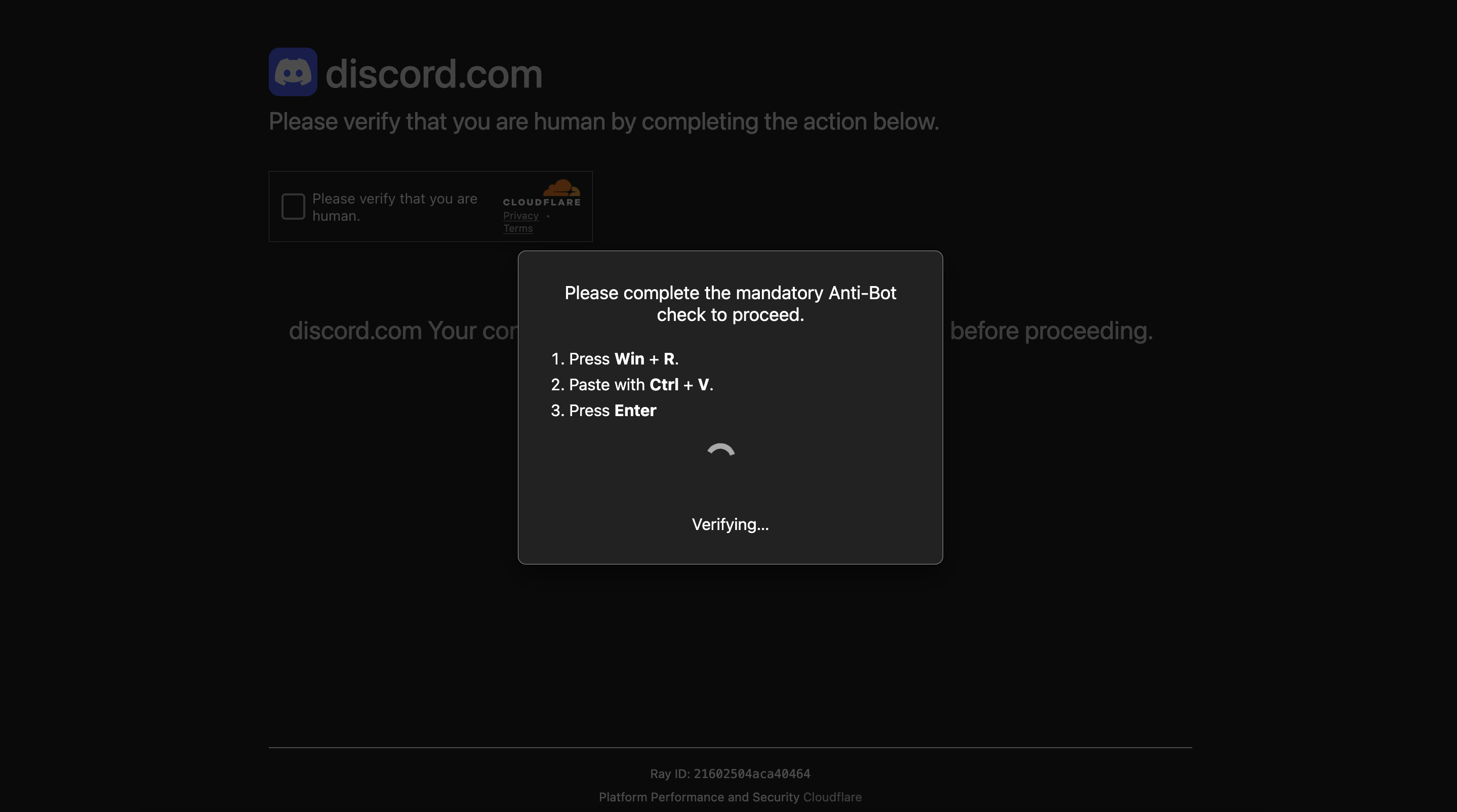
How this scam works
- 1
A page uses Discord branding and a Cloudflare-style verification box to appear trustworthy.
- 2
A dialog says the visitor must complete an Anti-Bot check and instructs them to press Win + R, paste text, and press Enter.
- 3
The pasted text launches PowerShell with an encoded command instead of showing the visitor what will run.
- 4
The hidden command can download or execute harmful content on the Windows computer.
✓ Do this
- Close the page without following its instructions.
- If you pasted or ran the command, disconnect the computer from the internet and ask a trusted adult or qualified technician for help.
- Change important passwords from a different clean device if the command was run, and revoke active sessions.
- Report the page to Discord and Cloudflare through their official reporting channels.
✗ Avoid this
- Do not press Win + R because a webpage tells you to.
- Do not paste commands into Run, PowerShell, Command Prompt, or Terminal from a verification page.
- Do not run encoded PowerShell commands that hide what they will do.
- Do not assume a Cloudflare logo or Discord branding proves that the page is genuine.
Different versions of this scam
0 examplesNeed help with a similar message?
Do not reply, pay, or use contact details in an unexpected message. Verify through the official app or website, then report what you saw so the Archive can connect related patterns.
Quick tip: Verify independently
Don’t call numbers or click links in unexpected messages. Go directly to the company’s official site or app and contact support from there.